

the way to download your favorite music from facebook
Although Facebook is mostly used to stay connected with our friends and family, many people use it to post videos. The good news is you can easily download FB MP3s for any video to your phone. To download Facebook songs, you can use a reliable solution like VidMate. In this post, I'll tell you how to download Facebook MP3 songs on any Android device.
Ever heard of the VidMate app? Yep, VidMate is an app designed especially for those who just want to browse social media or for those who want to download videos from platforms like YT and Facebook. Through this app you can easily download your favorite videos and MP3s anywhere for free, curious? Follow the steps below so you can easily use this app
1. You can browse Facebook directly in VidMate to find any video to download without security risks.
2. There is also an option to paste the Facebook video URL directly into VidMate to download it.
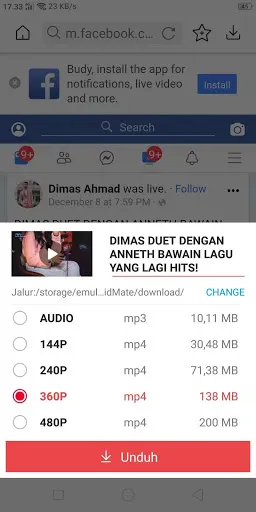
3. Once the video loads in VidMate, you will be given the option to save it as MP4 or MP3.
4. Next, you can download the Facebook MP3 song to your phone
5. There's no need to root your phone to download FB MP3 songs with VidMate.
Get Video Downloader
How to download your favorite music with VidMate
You can follow the steps below to download your favorite music from the VidMate app
First step: install the VidMate app on your Android
For the first step you just need to go to VidMate's official website to download the app; this app is completely safe to download to your phone.
Second step: open the VidMate app and open Facebook
After the app is installed on your Android device, the next step is to open it and open Facebook from within the VidMate app itself; you will be redirected to Facebook as usual.

Third step: Find the music video you want to download
After opening Facebook, the next step is to search for the music you want; here you just need to find the music video from Facebook, since Facebook does not provide an MP3 service to its users, you just need to find the music video on Facebook.

Fourth step: change the Facebook video file type to MP3
After finding the music video you want, just download it by pressing the download button provided, then choose the file type; to listen to the music choose the MP3 file type, then wait for the file to download and you can already listen to the music.
By using VidMate, you will no longer have trouble finding and downloading music from the videos you watch; you can download VidMate via this link.
Get Video Downloader

